RCS Messaging Service, OTP, OBD, and IVR: Smarter Ways to Talk to Customers
Businesses today don't just send messages. They talk to customers in many ways — texts, calls, and rich chats. Each method has its own job. Some confirm an order. Some verify a login. Some just remind you about an appointment. In this blog, we'll look at a few key tools businesses use every day, and how they work together to build a smoother, more trusted experience.
RCS Messaging Service: Texting, But Better
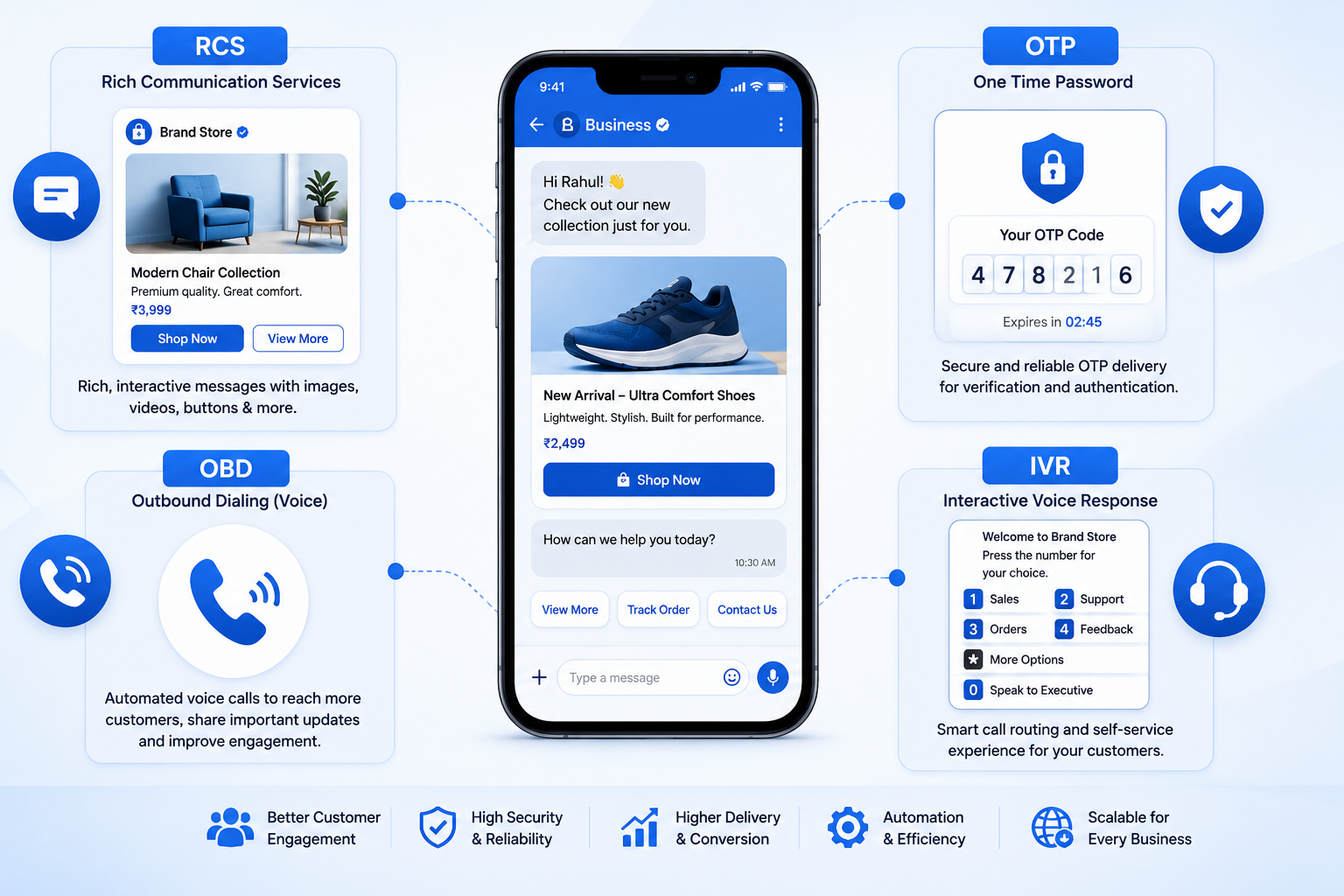
RCS Messaging Service turns a plain text into a rich chat. Instead of boring grey text, customers see images, buttons, and your brand logo right inside their normal messaging app. No extra app download is needed. A message can show a product photo with a "Buy Now" button below it. This makes the whole chat feel more like a real conversation, not just a text.
Brands like this option because it builds trust fast. A verified name and logo tell the customer the message is real, not spam. It also gives businesses room to be more creative. Instead of writing long text to explain an offer, you can just show a picture and let the customer tap a button.
Many businesses now use this as their main channel for order updates, offers, and reminders, simply because it looks better and gets noticed faster than plain text.
OTP: Keeping Logins Safe
OTP stands for One-Time Password. You've seen this many times. You try to log in or make a payment, and a code lands on your phone within seconds. That code proves it's really you. Fast delivery matters a lot here. Even a few seconds of delay can frustrate a user or make them abandon the login. A strong system keeps that delay close to zero, so users stay happy and safe.
This kind of verification has become the backbone of online safety. Banking apps, shopping sites, and even food delivery apps use it before every sensitive action. Without it, accounts would be far easier to break into, and customers would trust apps a lot less.
Speed and reliability matter more than anything else here. A code that arrives late is almost as bad as no code at all, since users often give up and try again, or worse, leave the app entirely.
Transactional Messages: Clear Updates, No Sales Talk
Transactional SMS messages are simple facts, not sales pitches. Think of an order confirmation, a payment receipt, or a delivery update. These messages don't try to sell anything. They just inform. Customers expect these to arrive fast and without delay, since they often relate to money or important actions. A reliable system builds quiet, steady trust over time.
These updates also reduce the number of support calls a business gets. When a customer already knows their order shipped or their payment went through, they don't need to call and ask. This saves time for both sides and keeps the whole process feeling smooth and predictable.
OBD: Voice Messages Sent to Many People
OBD stands for Outbound Dialing. It's a way to send a recorded voice message to many phone numbers at once. Think of it as a voice version of a bulk text. A bank might use this to remind customers about a bill. A clinic might use it to confirm appointments. It works well for people who may not read texts but will pick up a call or listen to a voicemail.
This method is especially useful in areas where many people still prefer a phone call over a text message. It reaches people in a more personal, direct way, and it works even on basic phones that can't display rich content or images.
Businesses often use this for time-sensitive alerts too, like payment due dates or service outages, where a voice call feels more urgent than a text.
IVR: Letting Customers Help Themselves
IVR stands for Interactive Voice Response. You've heard this too — "Press 1 for sales, press 2 for support." This system lets a caller move through options using their keypad, without needing to wait for a live agent right away. This saves time for both the customer and the business. It can also collect basic details before connecting the caller to the right team, making the whole process smoother and faster.
Good design keeps menus short and simple. Long, confusing menus tend to frustrate callers instead of helping them. The best setups usually offer no more than three or four options at each step, so callers don't feel lost or stuck listening to a long list.
Many businesses also use this system after hours, so customers can still get basic help or leave a message, even when no live agent is available.
Google RCS: The Standard Behind the Scenes
Google RCS is Google's own version of rich messaging, built into the Messages app on Android phones. It's part of the reason rich chats work so smoothly today. Google worked with carriers around the world to make sure these messages open properly on Android devices, without needing any extra setup from the user.
For businesses, this means your rich messages reach a huge number of Android users automatically. There's no app to install and no extra step for the customer. The message just works, right inside their default messaging app, which removes one of the biggest barriers to adoption.
This wide support is a big reason why more brands are moving away from plain text and adopting richer formats for their everyday communication.
Why These Tools Work Better Together
None of these tools need to work alone. A business might send a one-time code for login, follow up with a factual update once an order is placed, use a voice broadcast to remind about a payment, and offer a self-service phone menu for support calls. Meanwhile, rich chat messaging can carry the more visual parts of that journey, like showing an order photo or a "Track My Order" button. Together, they cover almost every way a customer might want to hear from a business.
Using more than one channel also acts as a safety net. If a text doesn't get read, a voice call might. If a call gets missed, a follow-up message can still get the point across. This layered approach means fewer missed updates and happier customers overall.
How Mishtel Brings It All Together
This is where Mishtel fits in. Mishtel offers rich messaging, one-time codes, transactional updates, voice broadcasting, and self-service phone menus, all from one place. Instead of managing five different vendors, a business can handle its full communication setup with a single trusted partner. This saves time, cuts costs, and keeps everything consistent, from the first login code a customer gets to the last support call they make.
Working with one partner also makes reporting easier. A business can track delivery, engagement, and response rates across every channel from a single dashboard, instead of piecing together data from multiple systems.
Final Thoughts
Customers don't think in terms of "channels." They just want quick answers, safe logins, and clear updates. Tools like rich chat messaging, one-time passwords, transactional alerts, voice broadcasting, and interactive phone menus each play a small but important part in that experience. Used together, they help a business feel more reachable, more trustworthy, and more human, even when the message is sent by a machine.